How it works in ASAP Motion
The Launch video card on the ASAP Motion dashboard turns a website or a short brief into a launch film:
- Paste your URL or a brief. The product website is usually enough. If the site is thin, add or use a short brief instead.
- ASAP Motion reads it and pulls out what the product is, who it is for and what it does.
- Confirm the storyboard. You see the proposed scenes before anything is made, and choose a length: 15, 30 or 45 seconds.
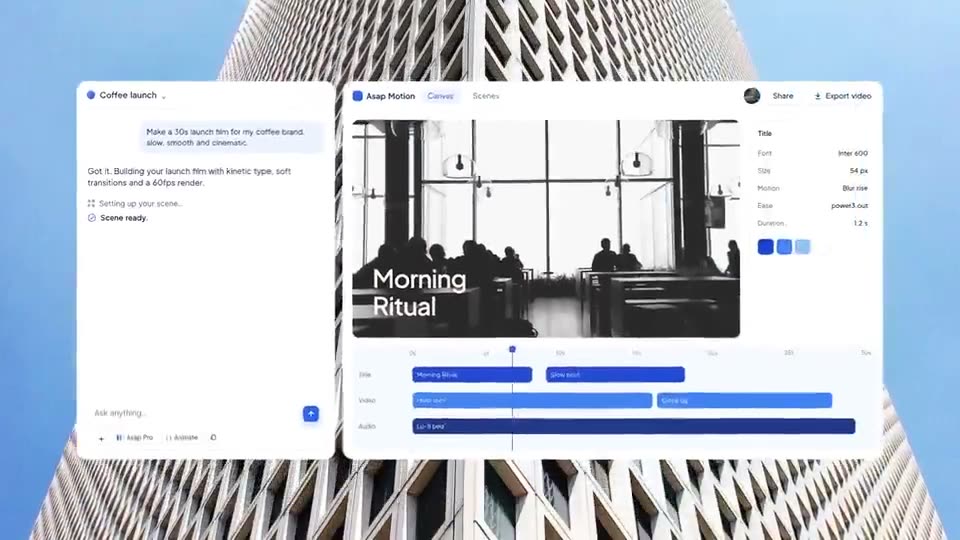
- The film is built as an editable project, not a flat clip.
- Edit and export. Change the copy, swap in screenshots, set colors, adjust timing, and export an MP4.
Credits are only spent when you confirm the storyboard and create the video: 6 credits for 15 seconds, 8 for 30 and 10 for 45.
Prepare your website first
A launch tool can only work with what the page says. Before you paste the URL, check that your homepage states, in plain words:
- What the product is in one sentence near the top.
- Who it is for.
- Two or three concrete benefits, each in its own line.
- One proof point you are happy to repeat: a number, a customer, an award.
If the page leans on vague slogans, the video will too. In that case, write a brief.
Writing a brief instead
A good brief is four or five lines:
Product: Notewell, an AI note-taker for sales calls.
For: account executives at B2B software companies.
What it does: records the call, writes the summary, pushes action items to the CRM.
Proof: teams save about 3 hours a week.
Call to action: Try it free at notewell.app
The launch video script template shows how to turn a brief into beats.
Check the storyboard carefully
The storyboard is where you save the most time. Before confirming, check:
- Is the hook about the user’s outcome, not your company?
- Is every claim true? Remove anything you would not say on your own site.
- Is the order right? Problem, product, proof, call to action.
- Is the length right for where it will play? 15 seconds for social cut-downs, 30 to 45 for a landing page or launch post.
Edit before you export
Treat the generated film as a strong first draft:
- Replace placeholder screens with your real screenshots or recordings.
- Rewrite any line that sounds generic. Read it aloud.
- Set your exact brand colors and add your logo.
- Retime scenes so each line can be read.
- Hold the call to action for at least two seconds.
Website video or template?
Use the website route when you want a video about your product quickly and your site already explains it well. Use a template when you want a particular look, such as the calm lilac of Wellness App Launch or the editorial blue of Course Platform AI Launch, and you are happy to fill it in. Many teams do both: a website-generated film for the landing page and a template-based teaser for social.
For the full process, from script to export, see how to make a product launch video.